Find my stuff: Home inventory
- 4.8
- Rating
- 50.00K
- Installs
- Free
- Price

 Analysis by App-foxy
When a home feels crowded, the difficult part is rarely owning too many things. The real problem is losing track of where those things are, especially after a move, during a renovation, or when several people share the same space. I reviewed Find my stuff: Home inventory as a practical home-organization app, and its value became clearest when I treated it as a working inventory rather than a simple search tool. The idea is straightforward: record what you own, give it a useful place in your personal system, and make future retrieval less dependent on memory.
That makes it relevant to much more than moving house. I can see it helping with storage boxes, hobby collections, rental contents, seasonal decorations, tools, spare cables, kitchen equipment, and items lent to relatives. It is a free app in the House & Home category, developed by Miquel Martinez, with an Everyone age rating. Its average rating is 4.8 from around 930 ratings, and it has passed 50K+ installs, which suggests that the simple inventory concept has found a real audience.
The app is called Find my stuff: Home inventory, but I would not judge it only by the promise of finding an object quickly. The more useful question is whether it helps you build a reliable chain from “I own this” to “I know where it is” to “I can retrieve it without opening every box.” In my experience, that chain is where the app earns its place, although it also reveals the discipline required from the person entering the information.
You May Also Like

 AccuWeather: Weather Radar
AccuWeather Review: A Quick, Clear Forecast for Everyday Decisions
For everyday plans, the best forecast is the one you can understand quickly. AccuWeather makes rain timing, radar, and local conditions easy to act on, with a few trade-offs.

 Hill Climb Racing
Why Hill Climb Racing Still Turns Crashes Into One More Run
A tiny car, a bumpy hill and one more upgrade: Hill Climb Racing keeps resurfacing because its simple chaos makes every near-miss feel personal.

 AliExpress - Shopping App
AliExpress Makes Global Shopping Feel Personal, but Shoppers Bear the Risk
AliExpress turns a global marketplace into a pocket-sized discovery engine. Its reach is useful, its shopping loop compelling, and its trade-offs easy to miss.

 Lords Mobile: Kingdom Wars
Lords Mobile Is a Kingdom-Building Routine, Not a Quick Match
A case-by-case verdict on the building, battles, device demands, and social commitments that make Lords Mobile rewarding for some players and exhausting for others.

 PDF Scanner app - TapScanner
TapScanner Makes Paperwork Easier to Capture, Check, and Share
TapScanner makes scanning with a phone feel less like a rescue operation and more like a dependable step in getting work done. Its capture tools are useful, though not flawless.

 Block Blast!
 Shows How Much a Puzzle Game Can Leave Out
A quiet grid game shows why puzzle players increasingly value instant clarity, repeatable skill and low-pressure play—and where the genre still needs to catch up.
More From Our News Desk
View All News


From a messy starting point to a usable home inventory
I start with the part of an inventory that usually takes the most thought: turning a chaotic room or a stack of boxes into a record I can actually use. The key is choosing a manageable first area and descriptions that will still make sense later, rather than trying to document everything at once. From there, I look at how clear locations and consistent labels make retrieval easier.
Begin with the problem you actually have
The best way to start is not by trying to catalogue an entire home in one sitting. That approach sounds productive but quickly turns an organizing task into a second job. I would begin with one contained problem: the boxes in a storage room, the equipment for a collection, or the items needed for a move. A narrow starting point makes it easier to decide what each entry should contain and how detailed the location needs to be.
For example, “winter decorations” is too broad if the purpose is to find one particular extension cable later. A more useful system separates the broad group from the individual object or a clearly defined box. The practical trade-off is time: recording every small item creates a more searchable inventory, while recording only boxes is faster but may still leave you searching inside those boxes.
This is one of the first non-obvious lessons with a home inventory app: the quality of the result depends less on how quickly you add entries and more on whether your naming style stays consistent. I would choose a simple pattern before entering many items, such as object name followed by a distinguishing detail. That makes later searching much more dependable than relying on vague labels like “miscellaneous” or “old stuff.”
Build locations that match real life
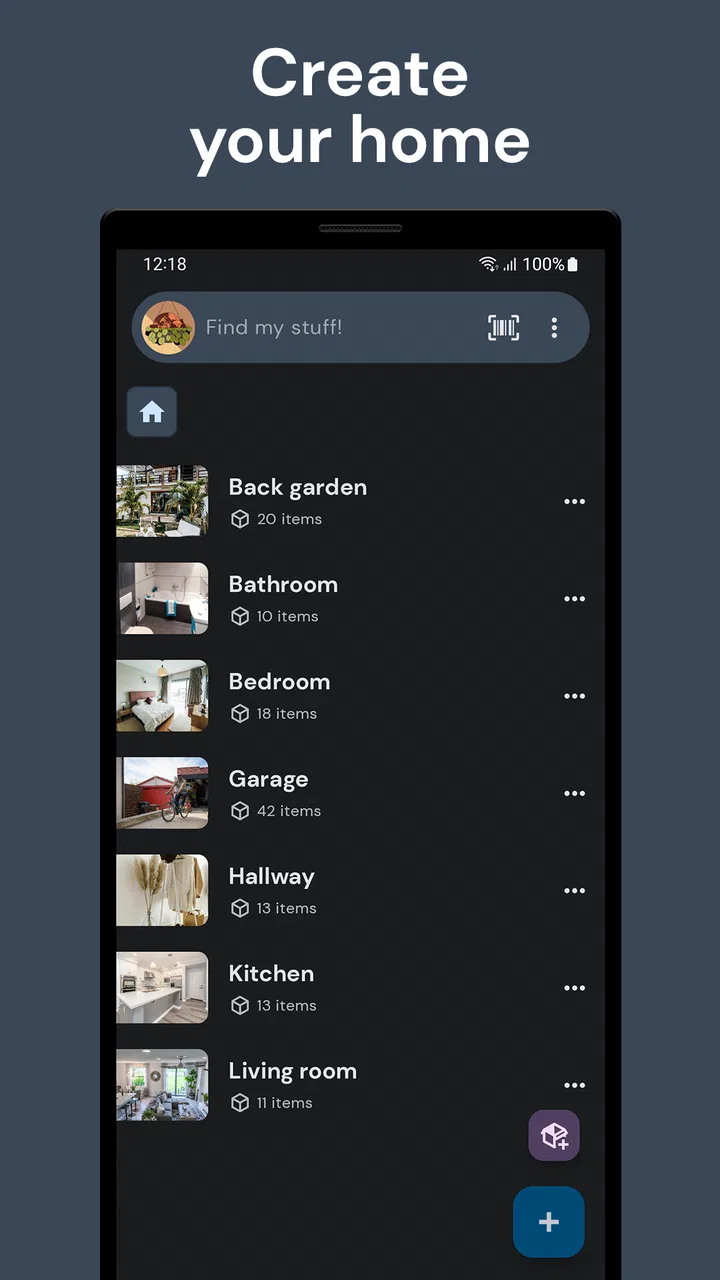
A useful location is not necessarily a formal room name. In a real home, “garage” may contain shelves, cabinets, boxes, and a workbench. “Bedroom” may include a wardrobe, under-bed containers, and a drawer. I found it more practical to think in layers: the broad area first, then the specific storage point. Even when the app is used for a small collection, this structure reduces the mental effort of remembering where an item was placed.
For a move, I would make the location reflect the temporary stage of the process. A box can be associated with its current room or storage area, but the naming should also make sense when the box is transported. This is where an inventory becomes more than a list: it becomes a handoff record between the old home, the moving process, and the new home.
There is a useful compromise for people who do not want to catalogue every object. Record the contents that would be expensive, annoying, or time-consuming to replace, and use broader entries for low-value everyday items. This approach is especially sensible for rentals, where documenting household contents can be more important than creating a perfect personal archive.
Use the app as an input tool, not a memory test
Adding information while holding an item is easier than trying to reconstruct everything later. I would keep the app open while unpacking or organizing and enter each object immediately after deciding where it belongs. That workflow prevents the common failure where several boxes are moved first and documented from memory at the end of the day.
A second practical tip is to update an entry at the moment an item changes location. If a power tool moves from a cupboard to the garage, the inventory should change then, not after the next project. An outdated location is worse than no location because it creates false confidence. The app can support the record, but it cannot know that an object has been moved unless the user maintains the record.
I also recommend treating uncertain information honestly inside your own naming system. If you are not sure which of two similar boxes contains a particular item, do not give both boxes an identical description. Distinguishing them by shelf position, purpose, or a visible label makes the eventual search much faster. This is a small organizational habit, but it is the kind of detail that separates a useful inventory from a digital pile of notes.
Move from entry to retrieval
The real test comes later, when you need something and no longer remember the original organizing session. A good entry should answer three questions quickly: what is the item, which version or type is it, and where should I look first? If the record answers only the first question, you still have much of the physical search ahead of you.
For collections, the same principle applies differently. A collector may care about grouping items by series, condition, or storage location, while a household user may care only about retrieval. I would avoid forcing both systems into the same level of detail. The app is more flexible when the inventory reflects the purpose of the collection instead of trying to imitate a professional database.
This also explains why the app can suit everyday organization even though its strongest use case may be occasional retrieval. You do not need to consult it constantly. Its value appears when the object is hidden, stored away, packed for transport, or shared between people who do not have the same memory of the home.
Make handoffs part of the design
Handoffs are where many home inventories either become genuinely helpful or stop being useful. During a move, one person may pack, another may transport, and someone else may unpack. In a rental, a tenant may need to remember what belongs to the property. In a shared home, one person may know the storage layout while another is the person who needs the item.
I would therefore write entries for someone who was not present when the item was stored. “Kitchen” may be enough for a familiar household member, but “top cabinet beside the extractor” is more useful for a visitor or a future version of yourself. The right amount of detail depends on the handoff: the more people involved, the less you should rely on personal memory.
There is a trade-off here. More descriptive entries take longer to maintain, and a system that feels tedious will eventually be abandoned. My preferred approach is to add detail only where confusion is likely: similar boxes, duplicate tools, small accessories, and items stored in temporary places. That gives the inventory precision without turning every spoon and book into an administrative task.
Where it compares well with ordinary alternatives
The usual alternative is a handwritten list, a note-taking app, or a spreadsheet. A paper list is quick and comfortable during packing, but it becomes awkward when locations change or when you need to search through many entries. A general notes app is more flexible for mixed information, yet it often depends on manually designed headings and consistent formatting. A spreadsheet offers powerful sorting, but it can feel excessive for a household and may discourage quick updates.
Find my stuff: Home inventory sits closer to a focused personal catalog. That focus is its advantage: you are less likely to confuse a home inventory with shopping notes, work tasks, or unrelated documents. It is also a disadvantage if you want advanced calculations, complex reporting, or a broad personal knowledge system. For those needs, a spreadsheet or database-style tool may be better.
I would also choose a general note-taking tool over this app for temporary lists that will be discarded after a move. The dedicated inventory approach makes most sense when the information will remain useful after the boxes are unpacked, or when the same objects will be located repeatedly over time.
A realistic moving-day workflow
Imagine a household preparing for a move. The starting condition is a storage room containing boxes from different years, with no dependable record of what is inside. Instead of opening everything, the user works one box at a time. Each entry receives a clear description and a location that reflects the current storage position. Items that are likely to be needed immediately are recorded with more detail than objects that can wait.
During loading, the inventory becomes a reference for the person directing the move. The handoff is not magical: someone still has to place boxes where they belong and keep track of changes. But the record gives everyone a shared starting point. At the new home, locations can be updated as boxes move from temporary piles into rooms, cupboards, or shelves.
The outcome is most valuable a week later, when the urgency has faded and memory has become unreliable. Instead of reopening every box, the user can check the recorded location first. This does not eliminate unpacking, but it changes the search from random opening to targeted retrieval. That is a modest result, yet it is exactly the kind of repeated convenience that makes an organization app worth keeping.
Collections and rentals need different levels of detail
For collections, I would use the app to answer practical questions such as where a particular item is stored and which container holds related pieces. A collection often contains duplicates or visually similar objects, so distinctive names matter more than broad category labels. Recording the storage location is usually more useful than writing a long description that does not help retrieval.
For a rental, the emphasis changes. The inventory can help a tenant keep track of furnishings, appliances, or accessories that belong to the property. The useful workflow is to document items when moving in, update the record if something is relocated, and check it again before moving out. I would still keep separate personal belongings and property-owned items clearly distinguishable, because mixing them can create confusion at the end of a tenancy.
Everyday organization is the lightest use case. You might record seasonal equipment, spare household supplies, or rarely used appliances. Here, speed matters more than exhaustive detail. If entering an item takes longer than finding it manually, the system is being used at the wrong level of precision.
What the app does not solve automatically
The main friction is maintenance. A home changes constantly, and an inventory that was accurate during unpacking can become misleading after a few reorganizing sessions. This is not a flaw unique to this app, but it is important when deciding whether to use one. People who dislike updating lists may get more value from broad storage labels and visible box markers than from a detailed digital catalog.
Another limitation is scale of ambition. If you want a full asset-management system with extensive financial records, complex condition tracking, or professional stock control, a focused home inventory app may feel too narrow. It is better suited to knowing what you have and where it is than to managing a business warehouse.
There is also a human handoff problem. If several people share the home but only one person maintains the inventory, the record can become dependent on that person. I would agree on a simple household rule: whoever moves an inventoried item updates its location. Without that habit, the app remains accurate only for the rooms controlled by its main user.
Version, cost, and who should install it
The current version is 1.24.1 and it supports Android 8.0 or later. The app is free to install, with in-app purchases ranging from $3.49 to $19.99 per item. That makes it easy to try the basic workflow before deciding whether the inventory method fits your habits. I would test it on one cupboard or one group of boxes first rather than committing the whole home immediately.
Because the content rating is Everyone, it is suitable as a household organization tool without the app presenting itself as a specialist professional system. Its audience is broad: movers, collectors, renters, families, and anyone who repeatedly forgets where rarely used items were stored. The best candidates are people willing to spend a little time creating clear records in exchange for faster retrieval later.
I would skip it if your needs are limited to a one-time checklist, if you require a spreadsheet with calculations, or if your home is already organized well enough that you can find everything without a search aid. I would also be cautious about cataloguing tiny, low-value objects individually. The app becomes less helpful when the input workload is larger than the problem it is meant to solve.
My conclusion after following the complete workflow
Find my stuff: Home inventory works best when I treat it as a bridge between physical storage and personal memory. The starting condition may be a chaotic room, a collection without a reliable map, or a rental full of items that need tracking. The step-by-step flow is simple, but the important work lies in choosing names and locations that another person, or my future self, can understand.
The strongest result is not a beautifully complete catalog. It is the moment when I can locate a specific item without opening every container in the house. That outcome becomes even more useful during handoffs, because a clear record gives packing, moving, unpacking, and shared-home routines a common reference point.
My honest recommendation is to use it selectively and maintain it at a practical level. Start with the storage areas that cause the most frustration, record high-value or hard-to-replace items first, and update locations whenever something moves. If you follow those habits, this free House & Home app can become a calm, searchable map of the parts of your home that memory handles poorly. If you want advanced inventory management or dislike maintaining records, a spreadsheet, a note-taking app, or a simpler physical labeling system may suit you better.
FAQs for Find my stuff: Home inventory
01What is Find my stuff: Home inventory used for?
Find my stuff: Home inventory is designed to help you create a searchable catalog of the belongings in your home. You can record items, organize them by rooms or categories, and add useful details such as descriptions, photos, quantities, purchase information, or storage locations. It can be especially helpful when you need to locate something quickly, prepare an insurance inventory, or keep track of valuable possessions.
02Can I add photos and detailed information to my inventory items?
Yes, the app is intended to let you build more useful records than a simple text list. Depending on the version and device, you can attach photos and enter details such as an item name, category, location, notes, quantity, and value. Adding clear information makes searching easier later, although the exact fields and available options may vary between Android and iOS releases.
03Does Find my stuff: Home inventory work without an internet connection?
The core inventory functions may be available offline, allowing you to view or edit information already stored on your device without a constant internet connection. However, features such as synchronization, cloud backup, sharing, advertisements, account services, or downloading updates may require internet access. Before relying on the app for important records, check its current offline and backup behavior in the store listing.
04Is my home inventory data private and secure?
Your inventory may contain sensitive information, including photos of your belongings, room locations, purchase details, or estimated values, so privacy deserves attention before using the app. Review the application’s privacy policy and permission requests, particularly those related to photos, storage, camera access, and network connectivity. Also consider using device security and keeping separate backups of important inventory records.
05Is Find my stuff: Home inventory free to download?
The app may be available as a free download, but some features can depend on the version, platform, advertisements, or optional in-app purchases. Before installing, review the Google Play or App Store listing for current pricing, subscription details, supported devices, and limitations. If you plan to use it for insurance documentation, confirm that exporting, backup, or sharing tools are included in the version you choose.
Pros
- Quickly catalog household items with photos
- names
- and categories.
- Useful for insurance records
- moving plans
- and organizing valuable belongings.
- Search and filters make it easier to locate stored items.
- Supports detailed notes for purchase dates
- warranties
- and item conditions.
- Helps prevent duplicate purchases by showing what you already own.
Cons
- Adding a large inventory manually can be time-consuming.
- The app’s usefulness depends on keeping item details updated.
- Photo-based records may use considerable storage space over time.
- Some advanced features may require payment or an upgrade.
- Sensitive information about valuables may raise privacy concerns.

Find my stuff: Home inventory
Gallery